Uncategorized
Ordering a Custom Montana Grizzlies Jersey: Name and Number Steps
Oct
Ordering a custom Montana Grizzlies jersey comes down to four moves: pick which custom design line you want, set the color and size, check out, and pass along your name and number in the checkout message (or by email after the order if you miss that box). The product listings describe both routes for sending your lettering. Below is the same process broken into small, checkable pieces, plus a note on when a ready-made design makes more sense.
First decision: which custom design?
The Montana Grizzlies jerseys on RobertHenrys include several custom listings, and they differ mainly by design line:
- Custom Montana Grizzlies 2026 – 40th Anniv Patch and Montana Grizzlies 2026 Vapor Limited Custom – 40th Anniversary Patch, for the newest look with the anniversary patch in the listing name.
- Custom Montana Grizzlies Name, Number 2025 Vapor, for last season’s design.
- Custom Montana Grizzlies Name, Number 1995 Throwback Limited, for the retro line. For context, gogriz.com (Oct 8, 2025) reported that Montana wore copper and gold 1995 throwback uniforms for Homecoming to mark the 30th anniversary of the 1995 National Championship, which the site calls the first in program history.
Choose the line before anything else. Color and size options belong to the specific tile you open, so starting there avoids backtracking.
Second decision: color
Across the category, the color names you will see are Black, Black Alternate, Maroon, Maroon Alternate, White, Orange, Orange Alternate and Black Alter. Each custom tile shows its own subset. Open your chosen design and look at what it offers rather than assuming every shade is available everywhere.
Third decision: size
Pick from the size options on that product page. Two habits help here. Measure a jersey or tee you already like the fit of, and compare. And if the custom jersey is a gift, ask the recipient’s usual size quietly through a friend rather than guessing.
Preparing your lettering
Before you check out, settle the exact text. A few minutes of care here avoids most correction emails later:
- Type the name once, then read it back slowly, letter by letter.
- Decide on capitalization. If you want all capitals, say so.
- Write the number in digits. If it has a leading zero you want kept, mention that clearly.
- If the name has an apostrophe or hyphen, keep it in the text and add a short note that it is intentional.
Checkout: where the name and number go
The listing instructions are short. You leave the custom name and number in a message at checkout. Paste your prepared text there in a compact form, for example “Name: YOURNAME / Number: 00”, replacing the placeholders with your real lettering. One line is easier to read correctly than a paragraph.
If the message box slipped by
The second route the listing gives is to email the name and number after ordering. Put the order number in your email so it can be matched, and repeat the lettering in the same compact form. The same route works if you notice a typo right after placing the order.
Prefer not to customize? Use a ready-made design
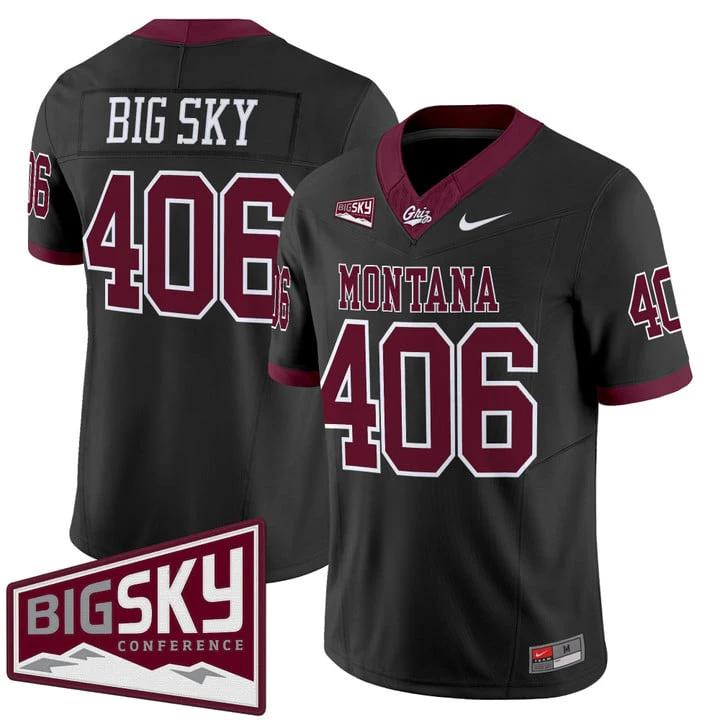
Not everyone wants to write a name. If you like the 2026 anniversary look but would rather skip the message step, the Team #1 Montana Grizzlies 2026 jersey with the 40th Anniv Patch is a fixed design you can buy by color and size alone. The same category also has a Grizzlie #26 listing and a Big Sky #406 listing in that line, and player-name tiles such as a Dave Dickenson #15 listing or a Marc Mariani #80 listing if you would rather have a set name.
How the jersey is made
The custom and fixed listings share the same construction notes: a 100% recycled polyester body, stitched tackle twill letters and numbers, embroidered applique and graphics, flatlock stitching and a satin twill jock tag. The cut is a V-neck with short sleeves and a reinforced tagless collar. Care instructions are to machine wash and tumble dry low.
Common slip-ups and how to avoid them
- Opening a fixed-name tile by accident. Check that the listing name includes “Custom” before adding to cart.
- Sending the number in words. “Twelve” can be misread; “12” cannot.
- Forgetting the order number in a follow-up email. Without it, matching your lettering to your order takes longer.
- Choosing color first. The shade you want might not be offered on the custom line you prefer, so pick the line first.
Summary
Pick a custom line, open that tile, choose color and size, then send your lettering in the checkout message or by email afterward. If you would rather not customize at all, a fixed design like Team #1 gets you the same anniversary-line look with fewer steps.