Uncategorized
Georgia Tech Custom Jersey Checkout: A Screen-by-Screen Walkthrough
Oct
Checking out with a custom Georgia Tech Yellow Jackets jersey takes four screens: the product page, where you choose color and size; the cart, where you confirm the item; the checkout form, where you type your name and number into the order message; and the confirmation email, where you double-check it all. If you skip the message, the listing lets you email your lettering after ordering. Here is what to do on each screen so the custom 2026 Vapor Limited jersey arrives the way you pictured it.
Screen 1: The product page
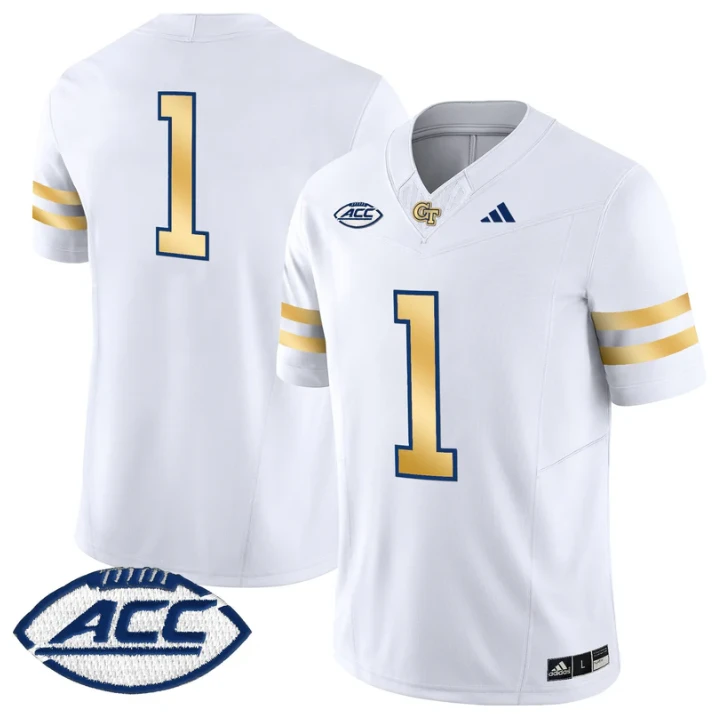
Start in the Georgia Tech Yellow Jackets jersey category and open the Georgia Tech Yellow Jackets 2026 Vapor Limited custom listing. The category holds several custom pages, so check the title at the top. Other custom versions you may see include:
- Custom Georgia Tech Yellow Jackets 2026 Vapor Limited
- Custom Georgia Tech Yellow Jackets Name and Number 2023 Premier Uniform Navy
- Custom Georgia Tech Yellow Jackets Name and Number 2023 Gasparilla Bowl Patch White and Brown
- Custom Georgia Tech Name and Number Edition White
Once you are on the right page, make two choices.
Color
Georgia Tech listings in this store show color options including Gold, White, Navy and alternate versions such as Gold Alternate and Navy Alternate. Pick the one you want and confirm the selection shows before you continue.
Size
The listing describes a V-neck with short sleeves and a reinforced tagless collar. Compare the size options on the page to a shirt you already wear comfortably, then select your size and add to cart.
Screen 2: The cart
Before moving on, look at the cart line. It should show the custom listing name, your color and your size. If you are buying more than one custom jersey, each should appear as a separate line. Fix anything here; it is the last easy place to change color or size.
Screen 3: The checkout form
Fill in contact and shipping details as usual, then find the order message or notes field. The product page asks you to leave your custom name and number there.
Write it in a format that cannot be misread:
GT 2026 Vapor Limited Custom, Navy, size L: Name = OKAFOR, Number = 18
Tips for this field:
- Type the name in capitals with any spaces, hyphens or apostrophes included.
- Use digits for the number.
- For more than one jersey, give each its own line with color and size, for example “Gold, M: OKAFOR 18 / White, S: OKAFOR 7.”
- Paste from a note you prepared earlier rather than typing fresh.
Read the field once more, then place the order.
Screen 4: The confirmation email
Open the confirmation and find the notes section. Make sure your lettering, color and size match what you intended. If something is off, reply quickly with your order number and the correction.
If you missed the message field
It happens, especially on a phone. The listing also allows you to email your name and number after ordering. Include:
- Your order number
- The product name as shown on the listing
- Color and size
- The exact lettering in capitals
Sending it right away keeps the order from pausing while the store waits for details.
Prefer to skip custom lettering?
If you reach checkout and realize you would rather not write anything, the category has ready-made listings. Number-only and team-word designs include a Team #1 listing, a Ramblin #404 listing and a Jackets #26 listing in the 2026 line. Player-name designs include a Justice Haynes #22 listing, a Noah Carter #24 listing and a Kyle Efford #44 listing. None of those need a checkout message.
What the listing says about construction
The product page describes a 100% recycled polyester body, stitched tackle twill letters and numbers, embroidered applique and graphics, flatlock stitching and a satin twill jock tag, with care listed as machine wash and tumble dry low. Since your lettering is stitched, the text you type at checkout is what gets sewn on.
Checkout at a glance
- Product page: confirm the custom 2026 Vapor Limited title, pick color and size
- Cart: verify each line
- Checkout: paste name and number into the order message
- Confirmation: proofread and reply fast if needed
- Missed it: email lettering with your order number