Uncategorized
How to Order a Custom Air Force Falcons Freedom 250 Jersey
Oct
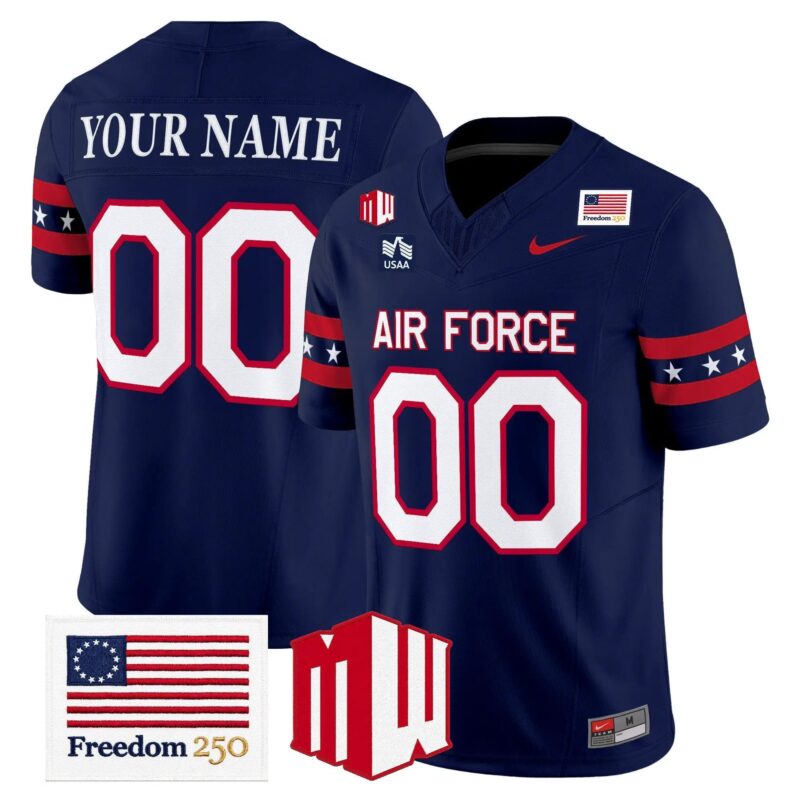
To order a custom Air Force Falcons Freedom 250 jersey, open the custom listing, choose your size, add it to the cart, and type the exact name and number you want into the message box at checkout. If you forget, you can email the store with the details right after the order goes through. That is the whole process, and the rest of this guide breaks each step down so nothing gets lost between your screen and the finished shirt.
Step 1: Start on the right listing
The Air Force Falcons jersey collection holds several custom options, and they look alike in thumbnails. The one this guide covers is the custom Freedom 250 Limited listing. Other custom pages in the same category include:
- Custom Air Force Falcons Name, Number 2026 Vapor Limited
- Custom Air Force 2025 Honor F-16 Name, Number 2025
- Custom Air Force Falcons Name and Number White Away Game, Royal Blue Home Game and Black Alternate Game
- Custom Air Force Falcons Name and Number Rivalry Legacy Series White
Read the product title at the top of the page before you go further. If it says Freedom 250, you are in the right place.
Step 2: Write down your lettering before you click anything
Open a notes app and type the back name and number exactly as they should appear. Doing this first keeps you from improvising in a small checkout field. A short checklist helps:
- Name in the spelling you want, with any spaces, hyphens or apostrophes included.
- Number as digits, for example 7 or 21, not spelled out.
- A note if you want the name left off and only a number on the back.
Copy that text so you can paste it later. Pasting removes the chance of a typo creeping in on a phone keyboard.
Step 3: Choose the size and add to cart
Pick your size from the options on the product page and add the jersey to your cart. The listing describes a V-neck with short sleeves and a reinforced tagless collar, so compare it against a shirt you already like wearing. If you are ordering more than one custom jersey, add each as its own line in the cart so every size stays attached to the right lettering.
Step 4: Paste your name and number into the checkout message
The product page asks you to leave the custom name and number in a message at checkout. Look for the order notes or message box on the checkout screen and paste the text from Step 2. Keep the format plain and labeled, such as:
Freedom 250 custom: Name = HARPER, Number = 12
If your cart holds two or more custom jerseys, list each one with its size so the store can match them: “Size L: HARPER 12; Size M: HARPER 4.”
Step 5: If you skipped the message, email right away
The listing also allows you to email your name and number after ordering. Include your order number, the product name (Custom Air Force Falcons 2026 Freedom 250 Limited) and the lettering, written the same labeled way. Sending it promptly keeps your order moving instead of waiting on missing details.
Step 6: Check your confirmation
When the confirmation email arrives, scroll to the notes section and read your lettering one more time. If something looks wrong, reply quickly with the correction and your order number. A one-letter fix is easy before production and much harder after.
What you are ordering, according to the listing
It helps to know what the page says about the build so your expectations match what shows up:
- A 100% recycled polyester body
- Stitched tackle twill letters and numbers
- Embroidered applique and graphics
- Flatlock stitching and a satin twill jock tag
- Care: machine wash, tumble dry low
Because your name and number are stitched tackle twill, they are part of the jersey rather than a print laid on top, which is one more reason to get the spelling right before you submit.
Would a ready-made listing be easier?
If you do not need your own lettering, the Freedom 250 line also includes pre-lettered choices. You can browse a Zoomie #719 listing, an America #250 listing or a Team #1 listing in the Freedom 250 set, and there are player-name versions such as a Dee Dowis #6 listing or a Chad Hennings #87 listing. Those skip the checkout message entirely. For anything personal, though, the custom page is the route, and following the six steps above keeps it simple.
Quick recap
- Confirm the page title says Freedom 250.
- Type and copy your lettering first.
- Select a size and add to cart.
- Paste the name and number into the checkout message.
- Email it with your order number if you missed that box.
- Proofread the confirmation and reply fast with any fix.