Uncategorized
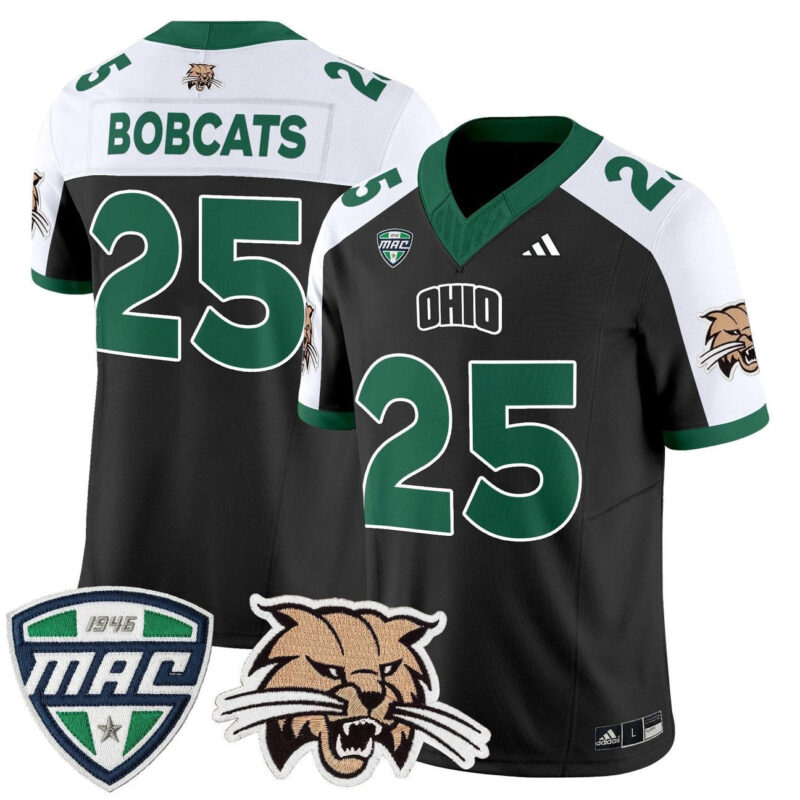
Ohio Bobcats 2026 Vapor Custom Jersey: A Simple Ordering Guide
Oct
Ordering the custom Ohio Bobcats 2026 Vapor jersey takes three parts: select your options on the listing, check out, and give the name and number in the message field at checkout. If that field gets skipped, the listing allows you to email the name and number after ordering instead. Everything else is about preparing your lettering so the message is accurate the first time. The guide below goes through it in order and points out the other custom Ohio designs in case a different look suits you better.
Which custom Ohio design are you ordering?
The Ohio Bobcats jersey category on RobertHenrys has several custom listings, and it helps to know which one you want before you start:
- Custom Ohio Bobcats Name, Number 2026 Vapor is the newest design and the one this guide follows.
- Custom Ohio Bobcats Name and Number Uniform White and Uniform Green are custom versions of the Uniform line.
- Custom Ohio Bobcats Name and Number 2023 Myrtle Beach Bowl Patch Green and Black carry the bowl patch named in the listing. For background, ohiobobcats.com (Dec 16, 2023) reported that Ohio beat Georgia Southern 41-21 in the 2023 Myrtle Beach Bowl.
The listing names on the Ohio page spell out the color in many cases, so the design you open largely settles the shade too.
Part 1: set up the listing
Open the custom Ohio Bobcats 2026 Vapor name and number jersey. Work through the options shown on the page:
- Choose any color or style option the listing displays.
- Pick your size. Compare against a jersey or tee you already wear, and consider sizing up if it will go over a sweatshirt.
- Leave quantity at one unless you are buying several with the same lettering.
Part 2: get your lettering ready
Do this before checkout so you are copying, not composing:
- Name: spelled exactly as it should be stitched. Ask the wearer to confirm if it is not your own.
- Number: written in digits. Note a leading zero if you want one.
- Special characters: if the name includes an apostrophe or hyphen, keep it and flag it as intentional in a few words.
One quick trick: read the name backward, letter by letter. It forces your eyes to see each character instead of the word you expect.
Part 3: checkout and the message field
Add the jersey to your cart and head to checkout. Look for the order message or note area. Per the listing, this is where the custom name and number go. Paste your prepared lettering in a single tidy line, for example:
NAME: [your lettering] — NUMBER: [digits]
Avoid adding extra commentary in the same line. If you need to explain something, put it on a second short line.
Plan B: email after ordering
Checkout layouts vary, and on a phone the message box can be below the fold. If you finish the order without filling it in, use the second option the listing gives and email the name and number after ordering. Put your order number in the subject, and repeat the same one-line format in the body. This is also how to correct a typo you notice right after placing the order; the sooner, the better.
Part 4: check the confirmation
When your confirmation arrives, compare it against the lettering you prepared. Confirm the listing name says Custom Ohio Bobcats Name, Number 2026 Vapor, and that size and options match what you meant.
About the jersey construction
The listing details describe a 100% recycled polyester body with stitched tackle twill letters and numbers and embroidered applique and graphics. Other notes include flatlock stitching, a satin twill jock tag, a V-neck with short sleeves and a reinforced tagless collar. For care, machine wash and tumble dry low.
Prefer a fixed back instead?
If you would rather not send lettering at all, the same page has many ready-made Uniform designs in White and Green, such as a Kurtis Rourke #7 listing, a Jacoby Jones #8 listing, a TJ Carrie #38 listing and a Tarell Basham #93 listing, along with 2023 Myrtle Beach Bowl Patch designs like a Sieh Bangura #5 listing and a Sam Wiglusz #12 listing. With those, you only choose size.
Recap
- Open the custom 2026 Vapor listing and set your options.
- Prepare the name and number in one line, checked letter by letter.
- Paste it in the checkout message.
- Missed it? Email the lettering with your order number after ordering.
- Check the confirmation against your note.